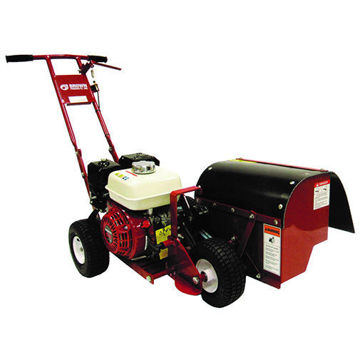
Brown B565H Bantam BedEdger

Manufacturer: Brown
This highly portable, lightweight machine functions much like the original BedEdger, but is designed to be lighter and more easily loaded/unloaded.
SKU: B565H
$3,337.68
i h

Brown B565H Bantam BedEdger

* MUST SHIP TRUCK FREIGHT. Call Us For A Great Freight Rate (800)769-3741!

The Brown B565H Bantam BedEdger is a compact, versatile edging and shallow-trenching machine powered by a 6.5-HP Honda engine, capable of cutting clean edges or narrow trenches at depths of 3½, 4½, or 5 inches, which you control by adjusting the front wheel’s five pop-pin positions; moving the wheel closer to the engine deepens the cut, while moving it forward makes the trench more shallow. To run the machine efficiently, start by selecting the correct depth setting and ensuring that the belts are properly tensioned and the rotor is clean and sharp, then start the engine at full throttle and let the rotor spin freely before gently lowering it into the soil. As you move forward, maintain a smooth, steady pace so the rotor can cut without bogging down; in very hard or clay soil, use a light rocking motion to help the blades bite without overloading the engine. For the best results, keep the rotor and hood clear of soil buildup, watch for consistent discharge of dirt, and avoid forcing the machine faster than the rotor can cut. Most performance issues are easy to troubleshoot: inconsistent trench depth usually means the pop-pin wasn’t fully seated or the rotor is worn; loss of cutting power often comes from loose belts, a dirty air filter, or over-aggressive cutting depth; vibration typically indicates debris on the rotor or a damaged rotor tooth; and starting problems are commonly fixed with fresh fuel, a clean spark plug, and a clear air filter. After each job, clean the machine thoroughly, inspect belt tension, check the rotor points for wear, lubricate any pivot points, and store the edger in a dry location to preserve belts and engine components. Using these techniques keeps the B565H cutting clean, working efficiently, and operating reliably across a wide range of soil and edging conditions.

Depth Capabilities

  • The B565H is built with a 6.5 HP Honda engine and uses a double belt & pulley drive system for reliable power delivery.
  • According to Brown’s spec sheet, the machine supports three standard trench/edge depths: 3½ in, 4½ in, and 5 in, depending on how you position the front wheel.
  • The front wheel has five “pop-pin” depth positions. By repositioning the pin, you can change the front-wheel setting: moving it toward the engine deepens the cut; moving it toward the front of the machine makes the trench more shallow.
  • The stock rotor is the 470-019 Bantam Bedmaster rotor. With that, at the factory pop-pin setting (middle), the B565H will dig a 3½” deep trench; moving the pin two holes toward the engine allows you to cut 5″ deep with the same rotor.
  • The machine can trench at a rate of up to 30 feet per minute, depending on soil conditions.

Troubleshooting Tips

Here are some common problems and how to solve them on the B565H:

  1. Poor Depth Control or Inconsistent Trench Depth
    • Verify the front-wheel pop-pin is in the correct hole for your desired depth. If it’s not fully seated, the depth will shift.
    • Check for wear or damage on the rotor; worn points can reduce effective cutting depth.
    • Make sure the rotor is clean. Soil or turf build-up on the rotor or hood can reduce cutting efficiency.
  2. Loss of Power or Engine Overloads When Cutting
    • Use full throttle when engaging the clutch, but don’t force the machine: push forward only when the rotor is at full speed.
    • If the machine feels overloaded, slow down its forward speed or make a shallower pass.
    • Inspect drive belts: loose or worn belts may slip, reducing power to the rotor. Adjust belt tension or replace if needed.
    • Clean or replace the air filter. A clogged filter starves the engine of air, hurting performance.
  3. Starting Issues
    • Confirm fresh, clean fuel; stale fuel can cause hard starts or poor running.
    • Inspect the spark plug: remove it, clean or replace it if fouled or worn.
    • Make sure the throttle is set properly (full open) before engaging the rotor.
  4. Excessive Vibration or Rotor Imbalance
    • If vibration becomes strong, stop immediately: an unbalanced rotor can damage bearings or belts.
    • Check for debris on rotor points and clean them.
    • If the rotor is damaged or points are heavily worn, replace it with a compatible rotor from Brown.
  5. Machine Doesn’t Advance or “Walk” Smoothly
    • Make sure the clutch lever returns smoothly and fully disengages when released.
    • Check tire pressure on the pneumatic wheels; low pressure can affect traction and stability.
    • In very hard soil (clay, compacted dirt), use a “rocking” or oscillating motion: alternate applying and relaxing downward pressure on the handle while edging to help the rotor cut more cleanly.

How to Use the B565H for Best Efficiency

To maximize performance, minimize labor, and extend the life of your B565H, follow these best-practice operating techniques:

  1. Setup & Depth Selection
    • Decide on the trench/edge depth you need (3½″, 4½″, or 5″), then reposition the front-wheel pin to the corresponding hole.
    • Confirm you are using the right rotor: the 470-019 is the standard, but Brown offers other rotors if different trench depths or widths are required.
    • Check belt tension and alignment before starting; tight, well-aligned belts improve power transfer and reduce slippage.
  2. Starting & Engaging the Rotor
    • Start the engine with throttle full open.
    • Before engaging the clutch, slightly lower the handle so the rotor clears the ground so it can spin freely.
    • Once the rotor is spinning, slowly lift the handle so the rotor contacts the ground gently; do not slam it in.
  3. Cutting Technique
    • Maintain a steady forward pace. The goal is for the rotor to cut continuously without bogging the engine.
    • In harder soils, use the “rocking” technique mentioned above to let the trencher bite without overloading.
    • Keep an eye on how the soil is being ejected: if clumps build too much, pause and clear out the hood area so buildup doesn’t slow down the rotor.
  4. Soil / Dirt Management
    • Because the machine piles excavated dirt neatly next to the trench, use that to your advantage: backfill soon while the soil is loose to reduce rework.
    • Clean the rotor and hood frequently, especially after working in sticky or clay soil; to prevent clogging.
  5. Maintenance & Storage
    • After use, blow off or wash away dirt, then dry the machine to prevent rust.
    • Regularly inspect rotor points and replace them when they become dull to maintain efficiency.
    • Grease or lubricate any pivot points per the owner’s manual.
    • Check and adjust belt tension periodically, especially after the first few hours of use, since new belts will stretch.
    • Store in a dry, covered space to protect belts, pulleys, and the engine from weather.
  6. Safety Considerations
    • Clear the work area of rocks, debris, pets, and people before trenching; lying debris can be dangerous, especially at startup.
    • If you hit an unexpected object (rock, root, pipe), stop immediately, disengage, and investigate before proceeding.
    • Always operate with the clutch lever fully engaged or disengaged when needed; don’t work with the rotor spinning freely without control.

NOTE:  This item is special order and rear wheels DO NOT STEER

Products specifications
Product TypeEquipment
Equipment ClassCommercial
Equipment CategoryBededgers
Engine BrandHonda®
0.0 0
Write your own review Close
  • Only registered users can write reviews
*
*
  • Bad
  • Excellent
*
*
*
Only registered users can write reviews